You can check any UK vehicle's MOT and tax status for free on GOV.UK with just the registration number. DVLA's check vehicle tax service shows whether a vehicle is taxed or declared off the road (SORN), and DVSA's MOT history service shows every test result, the mileage at each test, what failed and when the next MOT is due. For one vehicle that takes a minute. For a fleet, the useful question is how to turn that public data into dates you never miss.
This guide explains what each service shows, the limits to know about, especially for lorries, and how to build a routine that keeps a fleet's tax and MOT dates current.
The official services
Vehicle tax: DVLA
The check vehicle tax service tells you whether a vehicle has up-to-date vehicle tax or has been declared off the road (SORN). You only need the registration number. GOV.UK notes that a recently approved tax or SORN application can take a while to show.
MOT history: DVSA
The check MOT history service shows:
- whether the vehicle passed or failed each test
- the mileage recorded at each test
- what failed, and any minor problems (advisories)
- when the next MOT is due
- for some manufacturers, safety recalls
For tests in England, Scotland and Wales you can also download certificates and see where each test was done, using the 11-digit reference from the log book (V5C).
Coverage differs by vehicle. Results for cars, motorcycles and vans go back to 2005. Results for HGVs, trailers, buses and coaches go back to 2018.
Insurance: askMID
GOV.UK points to askMID, the Motor Insurance Database, to check whether a vehicle is insured. Fleet operators should confirm every vehicle on their policy appears there.
What the data can tell a fleet operator
Used regularly, these services answer questions a transport manager should be asking anyway:
- Is every vehicle taxed today? A lapsed tax payment on one vehicle in a fleet of twenty is easy to miss.
- When is each test due? The MOT history gives the due date, so you can book ahead.
- What keeps coming up at test? Repeated advisories for the same part point to a maintenance gap before it becomes a failure.
- Does the mileage make sense? Mileage at each test is a cross-check on your own records.
- Is a used vehicle what the seller says? Check the MOT history before you buy.
Limits to know about, especially for lorries
- HGV annual tests are a different system. Lorries over 3.5 tonnes have an annual test rather than a car-style MOT. Results since 2018 appear in the MOT history, but DVLA's own vehicle records may show "No details held by DVLA" for a lorry's MOT status.
- Tax status is a snapshot. It tells you today's position, not that a payment will go through next month.
- The data does not cover everything. Safety inspections, tachograph calibration and tail lift examinations are not in either service. See our HGV compliance checklist for those.
Why it matters: what happens when a date is missed
The consequences of a missed date land on the driver at the roadside, and on the operator afterwards.
- No valid MOT. GOV.UK says you can be fined up to £1,000 for driving a vehicle without a valid MOT. The exception is driving to a pre-arranged test.
- No tax. You must tax a vehicle to use it on the road, even if it is exempt and nothing is due. Anyone can check a vehicle's tax status from its registration, so an untaxed vehicle is easy to find.
- For an operator licence holder, a vehicle used without tax, insurance or a valid test also breaks a promise made to the Traffic Commissioner, and DVSA findings feed your OCRS score.
There is a cost even when nobody is stopped. A lorry whose test has expired cannot be used until it passes, and the first free test slot may be weeks away. One missed date can mean a vehicle off the road, a job handed to a subcontractor and a customer let down.
Buying or hiring a used vehicle
The same services are worth using before a vehicle joins the fleet. Check the MOT history for the pattern of failures and advisories, compare the recorded mileage with what you are told, and confirm the tax position. For a hired vehicle, check that its test runs beyond the hire period before it goes out on a job.
Checking a whole fleet
Checking twenty vehicles one at a time on GOV.UK works, but it is slow and easy to put off. There are better ways.
Use the official APIs
Both agencies offer the same data to software:
- DVLA's Vehicle Enquiry Service API returns a vehicle's details, including tax status, tax due date and MOT status, from the registration number. DVLA says it is not currently accepting new registrations while it upgrades its systems, and issues one key per company.
- DVSA's MOT history API now covers all vehicle types in a single API, including HGVs and trailers from 2018.
Most operators will not build their own software around these. The practical route is fleet software that already uses them.
Turn the data into reminders
Whatever tool you use, the data is only useful if it leads to action:
- Keep one record per vehicle, with its tax due date and its next test date.
- Refresh the data monthly, and whenever a vehicle is taxed, tested or changes hands.
- Look ahead. Book tests at least a month before they are due, earlier for lorries at busy test sites.
- Act on advisories. Send repeated advisories to your maintenance provider before the next inspection.
- Keep a note that you checked. Keeping vehicles taxed, insured and tested is one of the standard operator licence undertakings.
How Orca keeps vehicle data current
Orca uses DVLA's Vehicle Enquiry Service directly from the vehicle record.
- One button, official data. On a vehicle's record, the DVLA button looks the vehicle up by its registration and saves the details against it: make, colour, fuel type, year of manufacture, engine size, CO2 emissions, tax status and tax due date, MOT status and MOT expiry date (where DVLA holds them), type approval, wheelplan, the date the last log book was issued and the month of first registration.
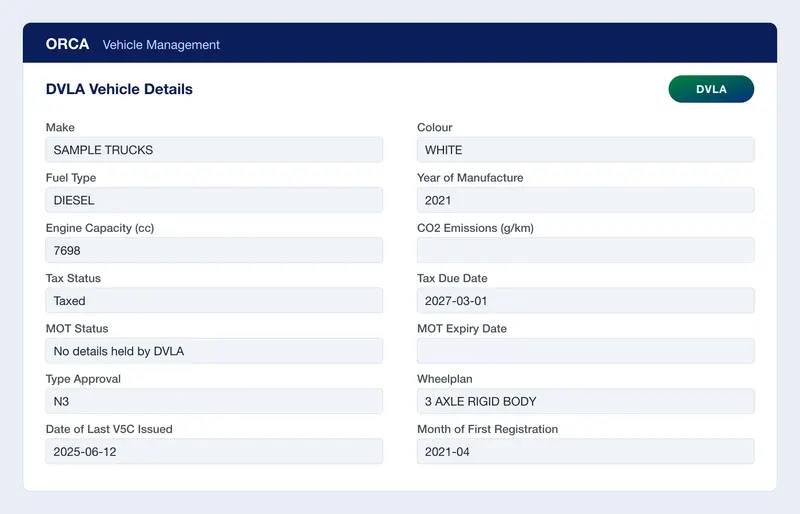
- Everyone sees the same dates. Because the details are saved on the vehicle, the office and the planners work from the same tax and MOT information, and pressing the button again refreshes it.
- Walkaround checks on the same record. The vehicle's walkaround checks and defects are listed against it too, so the official data and your own checks sit together.
Orca refreshes DVLA data when you press the button, not on a schedule. Make it part of the monthly routine above.
A monthly fleet data routine
- Refresh the DVLA details for every vehicle.
- List any vehicle that is untaxed or whose tax runs out in the next month.
- List tests due in the next 3 months and book them.
- Check each vehicle's MOT history for repeated advisories.
- Confirm every vehicle appears on askMID.
- Record that the check was done.
Frequently asked questions
How do I check if a vehicle is taxed?
Use DVLA's check vehicle tax service on GOV.UK. You only need the registration number. It shows whether the vehicle is taxed or declared off the road (SORN).
How do I check a vehicle's MOT history?
Use DVSA's check MOT history service on GOV.UK with the registration number. It shows each test result, the mileage, what failed, advisories and when the next MOT is due.
Does the MOT history include HGVs and trailers?
Yes, for tests since 2018. Results for cars, motorcycles and vans go back to 2005.
Can I check a whole fleet at once?
Not on the GOV.UK pages, which take one registration at a time. DVLA and DVSA offer APIs for software, and fleet software such as Orca uses them so you can look up each vehicle from its record.
Why does my lorry show "No details held by DVLA" for MOT?
Lorries over 3.5 tonnes have an annual test rather than a car-style MOT, and DVLA's vehicle record may not hold its result. Check DVSA's MOT history service, which covers HGV tests since 2018.
Orca brings vehicles, DVLA data, walkaround checks and driver compliance into one system for UK operators. See Orca for transport and logistics, or get in touch to see it with your own fleet.