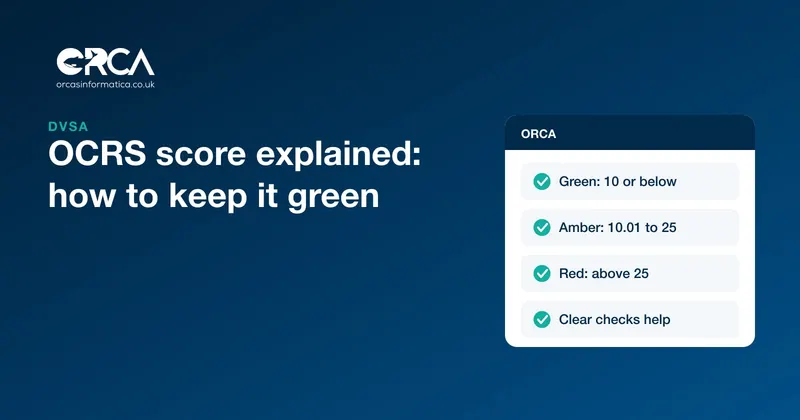
The Operator Compliance Risk Score (OCRS) is how the Driver and Vehicle Standards Agency (DVSA) decides which operators' vehicles to stop and inspect. Every operator licence gets a score built from three years of roadside checks, annual tests and investigations. Defects and offences add points; clear inspections bring the score down. Score 10 or below for roadworthiness and you are green; go above 25 and you are red, which means more stops, more inspections and more time off the road.
This guide explains how the score is calculated, what each band means, why a red score feeds on itself, and the practical steps that bring a score down.
What OCRS is
DVSA's OCRS guidance says it uses the score to decide which vehicles to inspect: the higher the score, the more likely an inspection. The score reflects the risk of an operator not keeping its vehicles safe or not following the rules, such as drivers' hours.
A few points about how it works:
- The score belongs to the operator licence, not to individual vehicles or drivers. If you hold licences in more than one traffic area, each has its own score.
- It uses data from a rolling 3-year period.
- It is recalculated every day, early in the morning.
- You can see your report by logging in to your vehicle operator licensing account.
The three scores
Each licence gets three scores:
- Roadworthiness, from annual tests, roadside inspections, site visits and desk-based assessments of your vehicles.
- Traffic, from roadside inspections and prosecutions for offences such as drivers' hours, tachograph and overloading.
- Combined, from the two together.
The bands
| Band | Roadworthiness | Traffic | Combined |
|---|---|---|---|
| Green | 10 points or below | 5 points or below | 10 points or below |
| Amber | 10.01 to 25 | 5.01 to 30 | 10.01 to 25 |
| Red | Above 25 | Above 30 | Above 25 |
Two other colours appear. Grey means no score, usually because the operator has had no contact with DVSA in the last 3 years. Blue is for operators in DVSA's earned recognition scheme.
How the score is calculated
The score is the total points from your events divided by the number of events. An "event" is an annual test, a roadside inspection or an investigation. That division is the most important thing to understand about OCRS: every clear inspection adds an event with no points, which lowers your average.
Points for roadworthiness
DVSA's guidance gives points by how serious the finding is:
| Finding | Points |
|---|---|
| Immediate prohibition, tyres, brakes or steering | 200 |
| Immediate prohibition, other defects | 100 |
| Delayed prohibition, tyres, brakes or steering | 50 |
| Delayed prohibition, other defects | 25 |
| Annual test failure, tyres, brakes or steering | 50 |
| Annual test failure, other defects | 25 |
A prohibition marked "S" (showing a significant failure in your maintenance system) scores double. Trailer annual test results are left out of the roadworthiness score, but prohibitions issued to a trailer at a test are included.
Points for traffic offences
Traffic offences are banded by seriousness, from 12.5 points for the least serious to 300 points for the most serious. DVSA can change the points, weightings and band thresholds at any time, so check the guidance for the current values.
Older events count for less
Each event counts in full for its first year, at three quarters in its second year and at half in its third. After 3 years it drops out. A bad year takes three years to fade, and a clear year keeps helping for three.
A worked example
These examples are simplified, ignore the weighting by age, and use the roadworthiness points above.
Operator A has had 4 events in the last year: 3 clear roadside checks and one annual test failure for a defect other than tyres, brakes or steering (25 points). The score is 25 divided by 4, which is 6.25. Green.
Operator B has had the same 25-point test failure, plus a delayed prohibition for a tyre defect at the roadside (50 points), and only 2 clear checks. That is 75 points over 4 events, a score of 18.75. Amber.
Operator C picks up one immediate prohibition for brakes (200 points) among 5 events. 200 divided by 5 is 40. Red, from a single bad stop.
Two lessons follow. One serious prohibition can push a small operator into red on its own, because a small fleet has few events to average it out. And the way back is not only to avoid defects but to be inspected and pass: each clear check divides the points across more events.
Why a red score feeds on itself
A red score makes a stop more likely. More stops mean more inspections, and if the underlying problems are still there, more prohibitions, which push the score higher. Each prohibition also takes a vehicle off the road, costs a job and lands on the Traffic Commissioner's desk.
The reverse is also true. An operator with sound vehicles who is stopped and passes adds clear events, and the score falls. A green score means fewer stops, which means less time lost at the roadside.
Practical steps to improve your OCRS
DVSA's own advice is to check your score regularly, track changes, set targets and act promptly when a negative event happens. In practice:
- Fix the walkaround check. Many defects that lead to a prohibition, such as tyres, lights, wheel fixings, leaks and insecure loads, are things a driver can spot before setting off. A real walkaround check, every day, is the cheapest OCRS improvement there is. See our guide to the DVSA walkaround check.
- Close every defect before the vehicle leaves. A defect reported but not fixed is a prohibition waiting to happen.
- Prepare for annual tests. Present vehicles after a safety inspection, not before, so the test finds nothing.
- Keep safety inspection intervals. A vehicle that misses its inspection is the one most likely to be stopped with a defect.
- Investigate every prohibition. Ask why the system missed it, not just how to fix the vehicle. If the same defect keeps appearing, the problem is the process.
- Get drivers' hours right. Traffic points come from drivers' hours, tachograph and overloading offences. Plan trips that can be done legally and check the tachograph data.
- Challenge errors. If an event on your report is wrong, DVSA has a process to correct it. A successful challenge removes the event and the score is recalculated.
- Watch the score monthly. Note your bands and the events behind them, and track the trend.
How Orca helps keep defects off the roadside
Roadside prohibitions are expensive, and most start as something small. Orca is built to catch them before the vehicle leaves the yard.
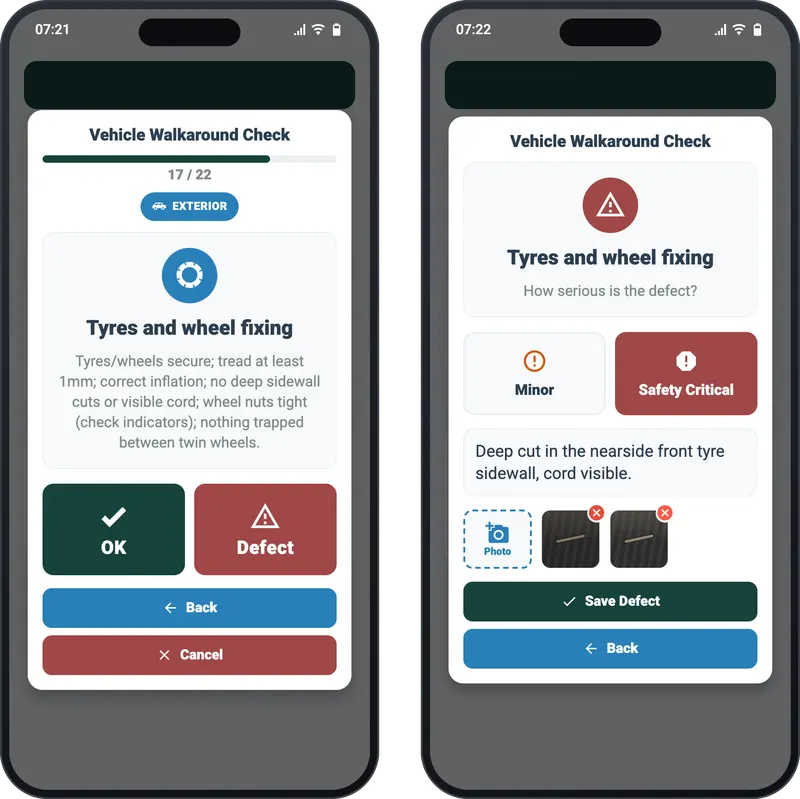
- Walkaround checks tied to the trip. The driver app can require the DVSA walkaround check before a trip starts, one item at a time in DVSA order.
- Defects graded with photos. A defect is graded minor or safety critical, described and photographed, so the office sees exactly what the driver saw.
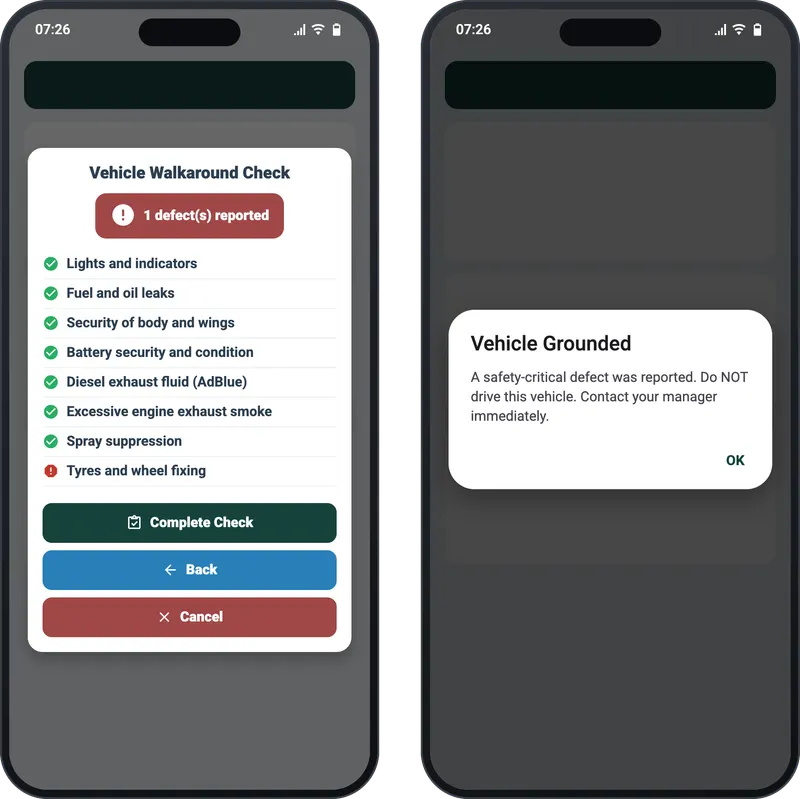
- Grounded means grounded. When a driver reports a safety-critical defect, the app tells them the vehicle is grounded and must not be driven.
- Dates that do not slip. Orca fetches each vehicle's tax and, where DVLA holds it, MOT status from DVLA, and messages the fleet manager each morning about driver licences, insurance and right to work documents that are expired or due within 2 months.
Orca does not analyse tachograph data, so pair it with your tachograph analysis for the traffic side of the score.
An OCRS routine
- Check your OCRS report in your operator licensing account every month.
- List every event behind an amber or red band and what caused it.
- Review walkaround check and defect records for the vehicles involved.
- Brief drivers on the defects found at the roadside.
- Check that the defects found were fixed and the cause dealt with.
- Challenge any event that is wrong.
Frequently asked questions
What is a good OCRS score?
Green: 10 points or below for roadworthiness and combined, and 5 points or below for traffic. A lower score means you are less likely to be stopped.
How long do points stay on an OCRS score?
3 years. Events count in full for the first year, at three quarters in the second year and at half in the third, then drop out.
Can a clear roadside check improve my OCRS?
Yes. A roadside check or annual test with no issues is a clear event. It adds no points but counts as an event, which lowers your average score.
Where can I see my OCRS score?
Log in to your vehicle operator licensing account to see your OCRS report. It is updated every day.
What does a grey OCRS band mean?
It means there is no score, usually because the operator has had no contact with DVSA in the last 3 years.
Orca brings walkaround checks, defect reporting, vehicle data and driver compliance into one system for UK operators. See Orca for transport and logistics, or get in touch to see how it fits your fleet.