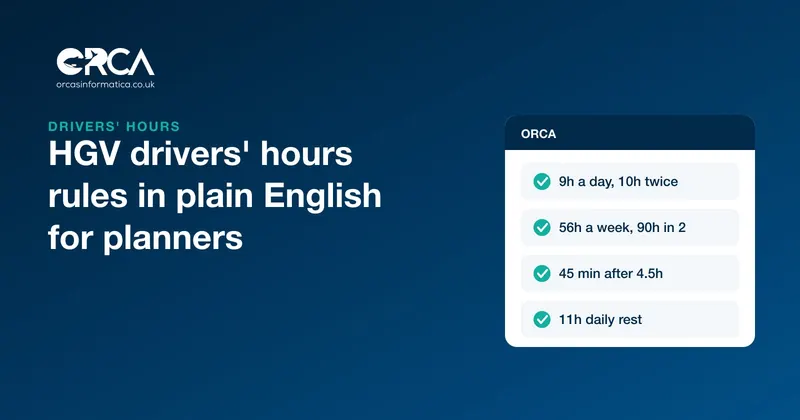
Under the HGV drivers' hours rules that apply to most lorries in the UK, a driver can drive for 9 hours a day (10 hours twice a week), 56 hours in a week and 90 hours in any two consecutive weeks. They must take a 45-minute break after no more than 4.5 hours of driving, at least 11 hours' rest each day (9 hours up to three times between weekly rests), and a weekly rest of at least 45 hours (which can sometimes be reduced to 24). Vans and other vehicles outside these rules usually fall under the separate GB domestic rules.
This guide sets out the rules in plain English for the people who plan the work, because many drivers' hours infringements are built into a plan before the driver ever turns the key.
Which rules apply to which vehicles
GOV.UK's guidance on drivers' hours for goods vehicles describes three sets of rules:
- Assimilated rules (previously called EU rules) apply to goods vehicles, or vehicle and trailer combinations, over 3.5 tonnes driven in the UK or to, from or through an EU country.
- AETR rules apply to vehicles over 3.5 tonnes driven to, through or from a country that follows the AETR agreement.
- GB domestic rules apply in England, Scotland and Wales to most goods vehicles that are exempt from the assimilated rules, which includes most vans.
For a typical haulage or removals business running lorries over 3.5 tonnes, the assimilated rules are the ones that matter, and the vehicle needs a tachograph.
The assimilated rules for lorries over 3.5 tonnes
All figures come from DVSA's drivers' hours and tachographs guidance.
Driving limits
| Limit | Rule |
|---|---|
| Daily driving | 9 hours, increased to 10 hours twice in a fixed week |
| Weekly driving | 56 hours in a fixed week |
| Two-weekly driving | 90 hours in any two consecutive fixed weeks |
A fixed week runs from 00:00 on Monday to 24:00 on the following Sunday. The 56-hour week and the 90-hour fortnight work together: a driver who drives 56 hours one week can only drive 34 the next.
Breaks
After a driving period of no more than 4.5 hours, a driver must immediately take a break of at least 45 minutes. The break can be split into a break of at least 15 minutes followed by one of at least 30 minutes, in that order.
Daily rest
- A regular daily rest is at least 11 continuous hours.
- It can be reduced to 9 continuous hours up to 3 times between weekly rest periods.
- It can also be split into two periods: at least 3 hours, then at least 9 hours, giving a total of at least 12 hours.
Weekly rest
- A regular weekly rest is at least 45 continuous hours.
- A reduced weekly rest is at least 24 hours but less than 45, and the shortfall must be made up with an equivalent period of rest taken in one block.
The GB domestic rules, mainly for vans
The GB domestic rules are simpler:
- 10 hours of driving in any working day.
- 11 hours of duty in any working day.
- A driver who does not drive for more than 4 hours on each day of the week is exempt from the daily duty limit for that week, and the duty limit does not apply on a day the driver does not drive.
Where a goods vehicle needs an operator licence and is not fitted with a tachograph, a driver who drives for more than 4 hours in a day must keep a written weekly record sheet, which the operator should check and sign.
How to plan trips with the rules in mind
The rules are about the driver, but the decisions that break them are often made in the office. Planning with them in mind is how infringements are avoided.
Build the break into the plan
A day with more than 4.5 hours of driving needs a 45-minute break, so a 9-hour driving day needs at least two breaks. Put them in the plan, at a place where the driver can actually stop, rather than leaving it to chance.
Use the 10-hour days deliberately
A driver has two 10-hour days per fixed week. Decide in advance which jobs need them. Spend them on Monday and Tuesday, and a delay on Thursday has nowhere to go.
Watch the fortnight, not just the week
A driver's 90 hours over two weeks is the limit that catches planners out, because last week's hours are on the tachograph, not on this week's plan. Know each driver's previous week before you plan the next.
Count loading, waiting and other work as time
Loading, unloading, waiting at a customer's site and the walkaround check are not driving, but they are working time, and they push back the end of the day and the start of the rest period. A plan that only counts driving time ends the day later than it looks.
Plan the rest, not just the drive
An 11-hour daily rest decides when tomorrow can start. A late finish tonight means a late start tomorrow, unless the driver uses one of their reduced rests.
Leave room for traffic
Plan to the limits and the first traffic jam creates an infringement. Plan a margin, especially on routes you know are slow.
Records and responsibilities
The driver must take the breaks and rests. The operator must plan work that allows them to, and must check that they did. The Senior Traffic Commissioner's guidance on transport managers says drivers' hours records should be kept for no less than 12 months, and that the transport manager should make sure the driving hours rules are kept.
In practice:
- download tachograph data from the vehicle and the driver card regularly
- analyse it for infringements
- talk to the driver about every infringement, and record that you did
- look for patterns that point to a planning problem rather than a driver problem
Drivers' hours offences feed directly into the traffic part of your OCRS score, and obeying the drivers' hours and tachograph rules is one of the standard operator licence undertakings.
How Orca helps plan realistic trips
Orca is where the work is planned, so it is where realistic plans start.
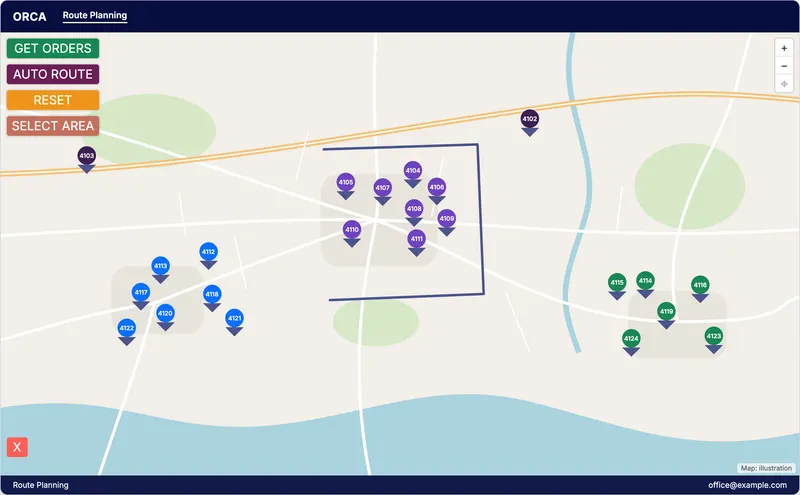
- Trips built on a map. The Route Planning screen shows open orders on a map. Auto Route groups orders that sit close together, and a trip's stops can be put in order automatically, so the driving in each trip is no longer than it needs to be.
- Each driver's trips in one place. Every trip records its driver, vehicle and dates, and the driver sees their trips in the Orca driver app, so the plan is the same in the office and in the cab.
- Walkaround checks as part of the trip. The DVSA walkaround check is done in the app at the start of the trip, so it is recorded with the time the driver started.
Orca does not read tachograph data or calculate drivers' hours. Use your tachograph analysis to confirm what happened, and use Orca to plan work that fits the rules in the first place.
A drivers' hours checklist for planners
- Know which rules apply to each vehicle: assimilated, AETR or GB domestic.
- Know each driver's hours from the previous week before planning this one.
- Plan breaks at real stopping places.
- Decide in advance which days are the two 10-hour days.
- Count loading, waiting and checks as working time.
- Plan tomorrow's start from tonight's finish plus the rest period.
- Leave a margin for traffic.
- Review infringements weekly, and change the plan when the same one repeats.
Frequently asked questions
How many hours can an HGV driver drive in a day?
Under the assimilated rules, 9 hours, which can be increased to 10 hours twice in a fixed week.
How long must an HGV driver rest between shifts?
At least 11 continuous hours, which can be reduced to 9 hours up to 3 times between weekly rest periods. The daily rest can also be split into 3 hours followed by 9 hours.
When must a lorry driver take a break?
After no more than 4.5 hours of driving, a break of at least 45 minutes. It can be split into 15 minutes followed by 30 minutes.
Do drivers' hours rules apply to van drivers?
Van drivers usually come under the GB domestic rules: 10 hours of driving and 11 hours of duty in a working day, with some exemptions. Vans over 3.5 tonnes, or used abroad, may come under the assimilated rules instead.
How long should drivers' hours records be kept?
The Senior Traffic Commissioner's guidance says drivers' hours records should be kept for no less than 12 months.
Orca brings route planning, trips, driver apps and walkaround checks into one system for UK operators. See Orca for transport and logistics, or get in touch to see how it plans your work.