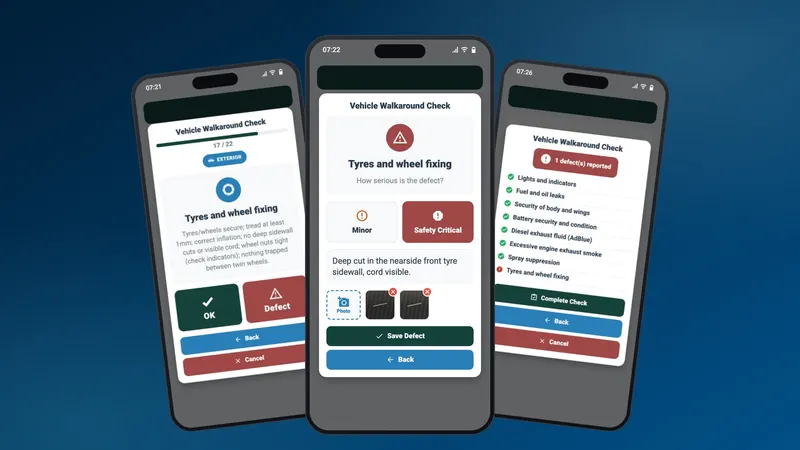
A DVSA walkaround check is the daily inspection a driver carries out on a heavy goods vehicle before driving it, to make sure it is safe and legal for the road. It covers 27 items, from mirrors and brakes to tyres, lights and the security of the load. Any defect must be reported in writing, and a vehicle with a dangerous defect must not be driven until it is fixed.
This guide covers the full HGV walkaround checklist, what counts as a defect, the records you need to keep, what happens if the check is skipped, and how drivers can do the whole thing on their phone with the Orca app.
What is a DVSA walkaround check?
The walkaround check, also called the daily vehicle check or first use check, is set out by the Driver and Vehicle Standards Agency (DVSA) in its guidance to carry out HGV daily walkaround checks. The driver walks around the vehicle, and trailer if there is one, checking a fixed list of items inside the cab and outside, and records what they find.
DVSA is clear that it is not optional. In its words, the check is a legal duty and a safety priority. It is also your evidence: DVSA officers can ask to see the record of your walkaround check at a roadside stop.
Who has to do the walkaround check, and when?
The driver does the check, before their journey. DVSA puts it simply: you are responsible for making sure your vehicle is safe to drive. So if another driver takes the same vehicle out later in the day, the check is theirs to do before they set off.
Responsibility does not stop with the driver, though. DVSA says that while drivers carry out the checks, operators and transport managers are ultimately accountable. The operator has to give drivers the time and the system to do the check, act on the defects they report, and keep the records. DVSA also points out that the walkaround check counts as working time, and drivers must be given enough time to do it properly.
How long should a walkaround check take?
DVSA does not set a time. What it expects is a check that is done properly, with every item actually looked at, rather than a form filled in from the cab. Build the time into the driver's start of shift so nobody feels they have to rush it.
The HGV walkaround checklist: all 27 items
These are the 27 checks in the DVSA guidance, in its own order and grouping.
Inside the cab
- Front view: mirrors, cameras and glass. Nothing blocking the swept area of the windscreen, no cracks, all mirrors secure and undamaged.
- Windscreen wipers and washers: present, not worn, working.
- Dashboard warning lights and gauges: including engine, emissions, ABS and EBS warning lamps.
- Steering: no excessive play or jamming, power steering working.
- Horn: works and can be reached from the driver's seat.
- Brakes and air build-up: air builds up correctly, no leaks, service brake and parking brake working.
- Height marker: shows the vehicle's correct current height.
- Seatbelts: no cuts or fraying, latch secure, belt retracts.
- Security and condition of cab, doors and steps.
Outside the vehicle
- Lights and indicators: all working, clean and the correct colour.
- Fuel and oil leaks: filler cap fitted, no leaks with the engine running.
- Security of body and wings: including sideguards and under-run guards.
- Battery security and condition.
- Diesel exhaust fluid (AdBlue): enough for the journey.
- Excessive engine exhaust smoke.
- High voltage emergency cut-off switch: for electric vehicles.
- Alternative fuel systems and isolation: for gas and other alternative fuels.
- Spray suppression: flaps fitted, secure and not clogged.
- Tyres and wheel fixing: tread depth, inflation, no deep cuts or visible cord, wheel nuts secure.
- Brake lines and trailer parking brake.
- Electrical connections: wiring insulated, trailer couplings secure.
- Coupling security: trailer correctly located, secondary locks in place.
- Security of load: the load cannot move.
- Number plate: not broken, dirty or covered.
- Reflectors: including side reflectors.
- Markings and warning plates: including hazard panels for dangerous goods.
- Other equipment: anything specific to the vehicle.
Items 16 and 17 only apply to electric and alternative-fuel vehicles, and items 20 to 22 are mostly about trailers and couplings. DVSA publishes a walkaround check diagram that is worth keeping in every cab. Bus and coach drivers have their own version: PSV daily walkaround checks.
Minor or safety-critical: what to do when you find a defect
Not every defect stops the vehicle, but every defect must be reported.
| Type of defect | Example | What happens |
|---|---|---|
| Minor | For example, a cracked but working marker lens | Report it. The operator decides when it is repaired. |
| Safety-critical | For example, a tyre with a deep sidewall cut and cord showing | Report it. The vehicle must not be driven until it is fixed. |
If there is any doubt about whether a defect makes the vehicle unsafe, treat it as safety-critical and do not drive. DVSA's guidance is blunt: you can get an unlimited fine and a prison sentence for using an HGV in a dangerous condition.
Reporting defects and keeping the records
DVSA's Guide to maintaining roadworthiness sets out what a defect report must include:
- the vehicle registration or identification mark
- the date
- details of the defect or symptoms
- the name of the person reporting it
- who the defect was reported to
- the assessment of the defect
- the rectification work, and the date it was completed
Two record keeping rules catch operators out:
- Driver defect reports must be kept for at least 15 months.
- Nil defect reports (checks where nothing was found) are good practice, and DVSA recommends keeping them for at least 3 months. They are the only proof that a check was done on the days nothing was wrong.
Electronic records are allowed. DVSA expects a digital system to be tamper proof, so records cannot be changed later, with date and time stamping and a clear audit trail from the report to the repair.
What happens if the walkaround check is skipped?
At the roadside, DVSA and the police can stop a vehicle, check it, and prevent it being driven until problems are fixed, or issue fines. A defect that a basic walkaround check would have caught is hard to explain.
For the business, the consequences can be more serious. Operators are accountable for the walkaround and defect reporting system, and if it is not working, regulatory action by a Traffic Commissioner can lead to the operator's licence being curtailed, suspended or revoked.
Paper forms or an app?
Paper defect books still work, but they have well known weak spots: sheets filled in after the fact, illegible handwriting, reports that never reach the workshop, and books that go missing just when an auditor asks for them.
DVSA recognises that digital walkaround check apps can improve accuracy, streamline reporting and connect to maintenance. It also makes an important point: an app is a support tool, not a replacement for physically inspecting the vehicle. The right app makes the proper check the easiest thing to do, not a box ticked from the cab.
How the Orca driver app handles DVSA walkaround checks
Orca is our transport and logistics software. Its driver app has the DVSA walkaround check built in, tied to each trip, so it happens at the right time without anyone having to remember.
The check comes with the trip
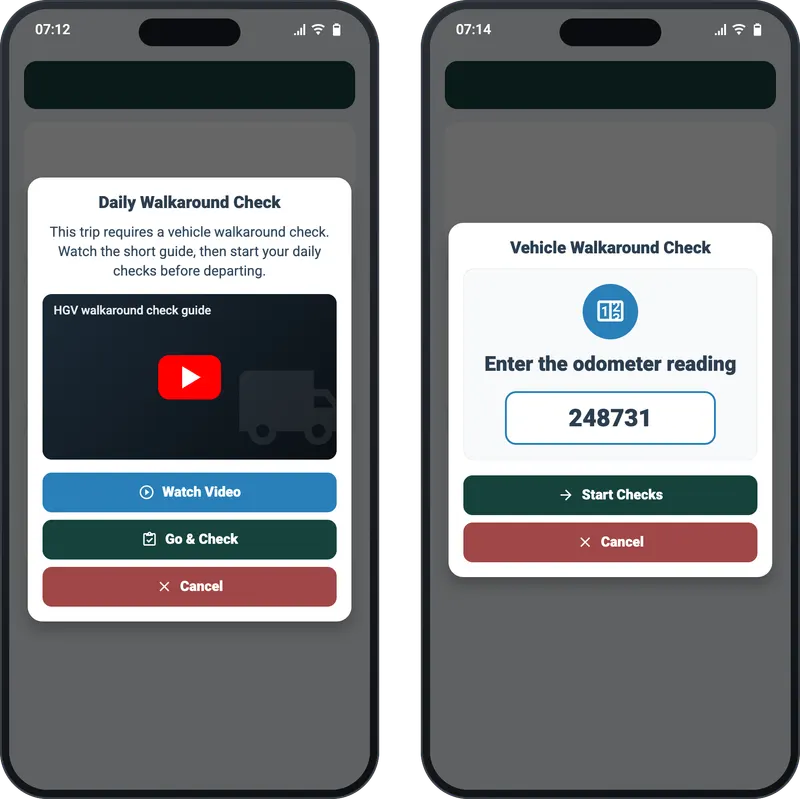
An operator can require a walkaround check before a trip. When the driver goes to start it, the app asks for the daily walkaround check first, with a short video guide for new drivers, then the odometer reading.
One item at a time, in DVSA order
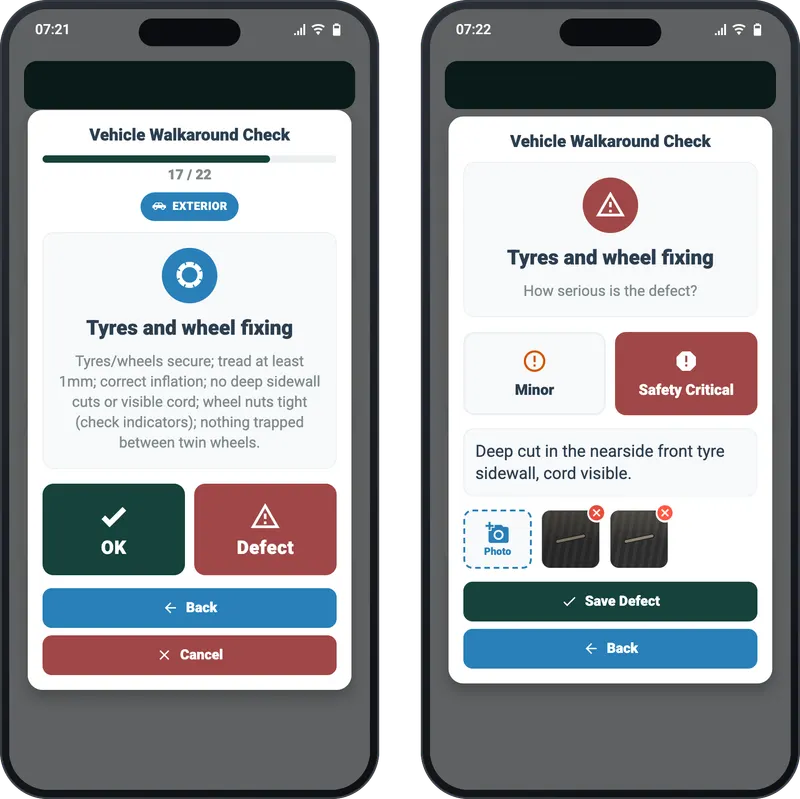
The 27 DVSA items are asked one at a time, in the official order, each with a short reminder of what to look for and two large buttons: OK or Defect. Only the items that apply are shown, so the electric vehicle questions appear for electric and alternative-fuel vehicles, and the trailer questions only when a trailer is attached. Drivers can use the app in English or Turkish.
Defects graded on the spot, with photos
When a driver marks a defect, the app asks how serious it is, Minor or Safety Critical, and lets them describe it and take up to five photos. The photos go to the office with the report, so nobody has to guess what "tyre damaged" means.
A safety-critical defect grounds the vehicle
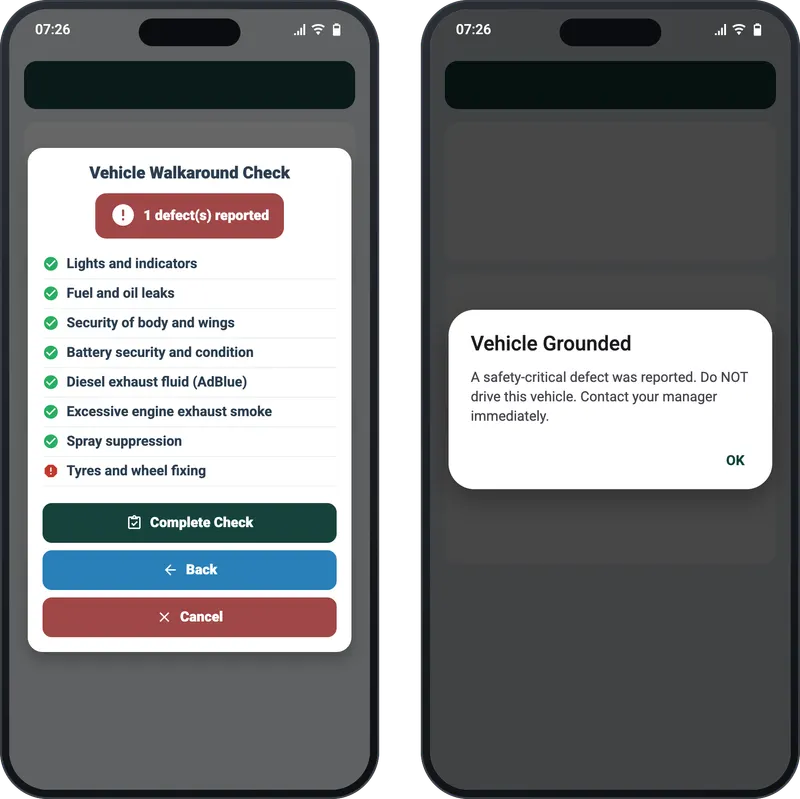
At the end the driver sees a summary of every item. If they reported a safety-critical defect, the app tells them the vehicle is grounded and must not be driven, and does not let the trip start. Minor defects are recorded and the driver is reminded to tell their manager.
It works without signal
Yards and lay-bys often have no signal. A completed check is saved on the phone first and sent automatically when the connection comes back, and it is never recorded twice, even if the signal drops halfway through sending. Every check records when it started, when it finished and when each item was answered, against the vehicle, the trailer and the trip.
What the office sees
In Orca, every check and defect is stored against the vehicle, with the driver's photos. Each defect moves through its own status (open, acknowledged, in repair, rectified) with the rectification date and notes, which is the report-to-repair trail the DVSA guide describes. The dashboard shows walkaround completion against the vehicles that actually ran, the share of checks reporting defects, fleet availability and the average time from a defect being reported to it being fixed.
A walkaround check routine that stands up to an audit
- Give drivers the time: the check is working time, so plan it into the shift.
- Make the check a condition of starting the trip, not a separate form.
- Record every check, including nil defects.
- Grade defects when they are found, and never move a vehicle with a safety-critical one.
- Close every defect with what was done, when and by whom.
- Keep defect records for at least 15 months, and nil defect records for at least 3.
- Look at the numbers every week: missed checks and repeat defects tell you where to act.
Frequently asked questions
Is the walkaround check a legal requirement?
Yes. Drivers are responsible for making sure their vehicle is safe to drive, and DVSA describes the daily walkaround check as a legal duty. Operators are accountable for having a system that makes it happen.
Do I need to record a check if I find no defects?
DVSA's HGV guidance says to record nil defects if you do not find any, and its roadworthiness guide calls nil reports good practice. A nil report is your proof that the check was done.
How long do walkaround check records need to be kept?
Driver defect reports must be kept for at least 15 months. DVSA recommends keeping nil defect reports for at least 3 months.
Can drivers use an app instead of a paper defect book?
Yes. Electronic systems are accepted, as long as records cannot be altered afterwards and are date and time stamped with a clear audit trail. The app supports the check; the driver still has to physically inspect the vehicle.
Does the walkaround check apply to vans?
The DVSA walkaround guidance is written for HGVs, with a separate version for buses and coaches. Every driver must make sure their vehicle is roadworthy, though, so a daily check is good practice for vans too, and Orca can require one before any trip.
Orca brings walkaround checks, defect management, route planning and live tracking into one system for UK operators. See Orca for transport and logistics, or get in touch and we will show you the walkaround check on your own fleet.